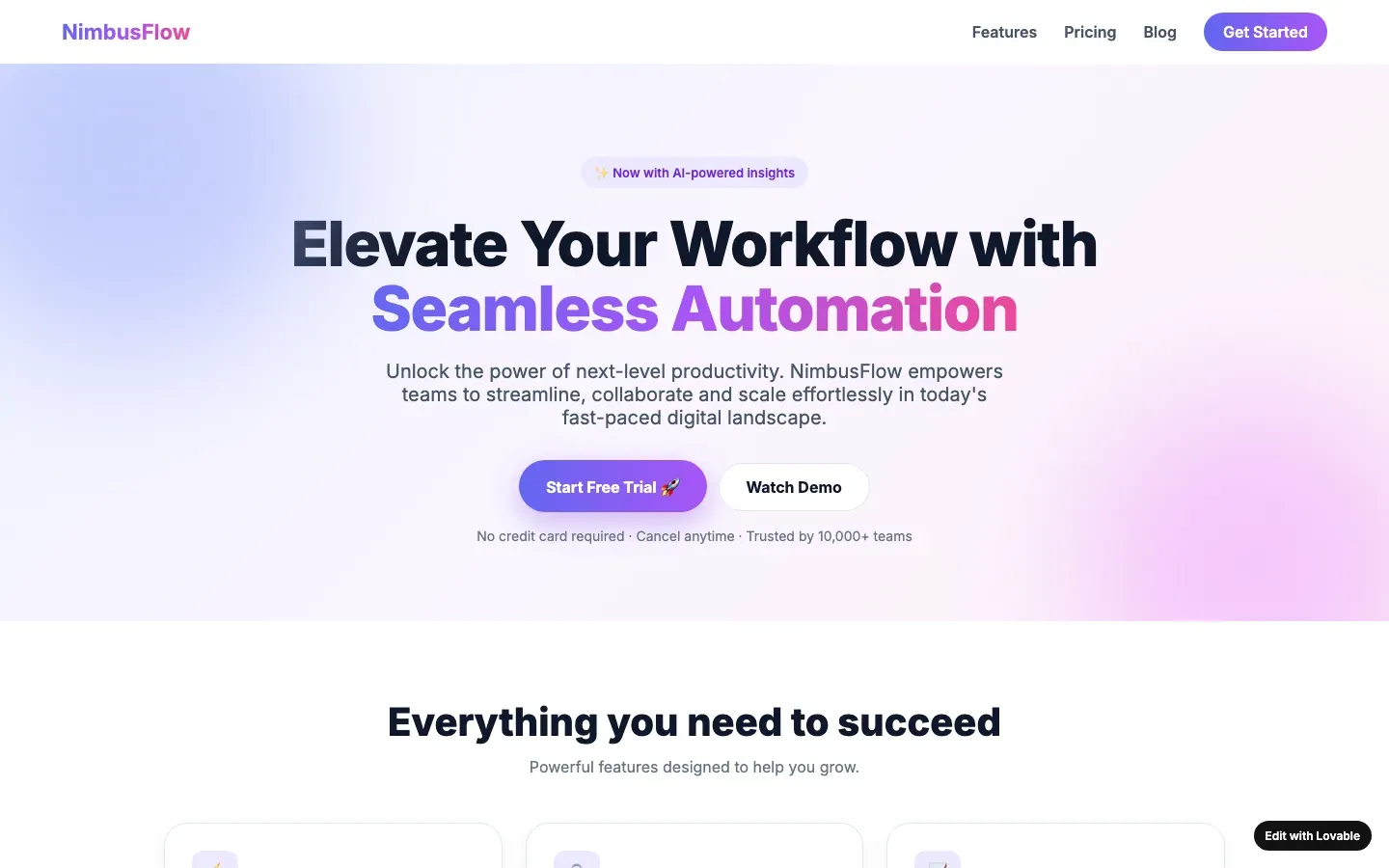
What it looks like
A small floating label in the bottom corner of the page: “Edit with Lovable”, “Made in Framer”, “Made in Bolt”, “Built with Durable”, “Made with Replit”, “Built with v0”, “Made in Webflow”. The free plan adds it, and removing it takes a paid plan or a settings change that nobody made.
Why it gives a page away
The tool signed the work. A strong tell not because using a tool is wrong, but because leaving the badge means nobody looked at the corner of their own home page, which is where every visitor’s eye ends up. Each builder documents the badge and how to remove it, so leaving it is a choice not made.
How to check your own site
Open your home page on a phone and scroll to the bottom. Look at both corners. Then look at the published address: a builder’s subdomain is the same tell in a different place.
What a designer would do instead
Remove the badge in the builder’s publishing settings, or pay for the plan that does, and connect a domain. If the budget does not allow it, say on the page that it is a first version made with a tool; honesty is not a tell.
When it is not a tell
A prototype shared as a prototype, with a preview link, to people who know it is one. The tell counts when the badge is on the address printed on the business card.
Sources
- Lovable documentation, FAQ (badge and lovable.app)
- Framer help, "How do I remove the Made in Framer badge?"
- Bolt support, "Host your Bolt project"
- Durable help, "Built with Durable" badge
- Replit docs, "Starter plan" (Made with Replit badge)
- Vercel Community, "Built with v0 badge"
Builders whose defaults include this one
An entry names a builder only when its fingerprints are visible; this tell is one of them for Bolt, Durable, Framer AI, Lovable, Replit Agent and Webflow AI and Relume.
Other tells in interaction and technology
- A form that submits to nothing: A contact or sign-up form with no action, no handler, or a success message that appears whatever you type.
- A template nobody customised: The demo template's structure, section order, placeholder image ratios and sample headings are all still there, with only the words changed.
- Buttons that go nowhere: Primary buttons linking to "#", navigation items that reload the home page, a "Learn more" that learns nothing.
- Default favicon: The browser tab shows the builder's icon, the framework's logo, or nothing.
- Errors in the console: The browser console shows failed requests, missing images or script errors on the home page.
- Published on the builder's domain: The site lives at something.lovable.app, bolt.host, replit.app, framer.website, durable.site, webflow.io or godaddysites.com, with no domain of its own.
- Secrets or prompts in the page source: API keys, database credentials or the original prompt visible in the client-side JavaScript or the HTML comments.
Score a site against every tell in Interaction and technology