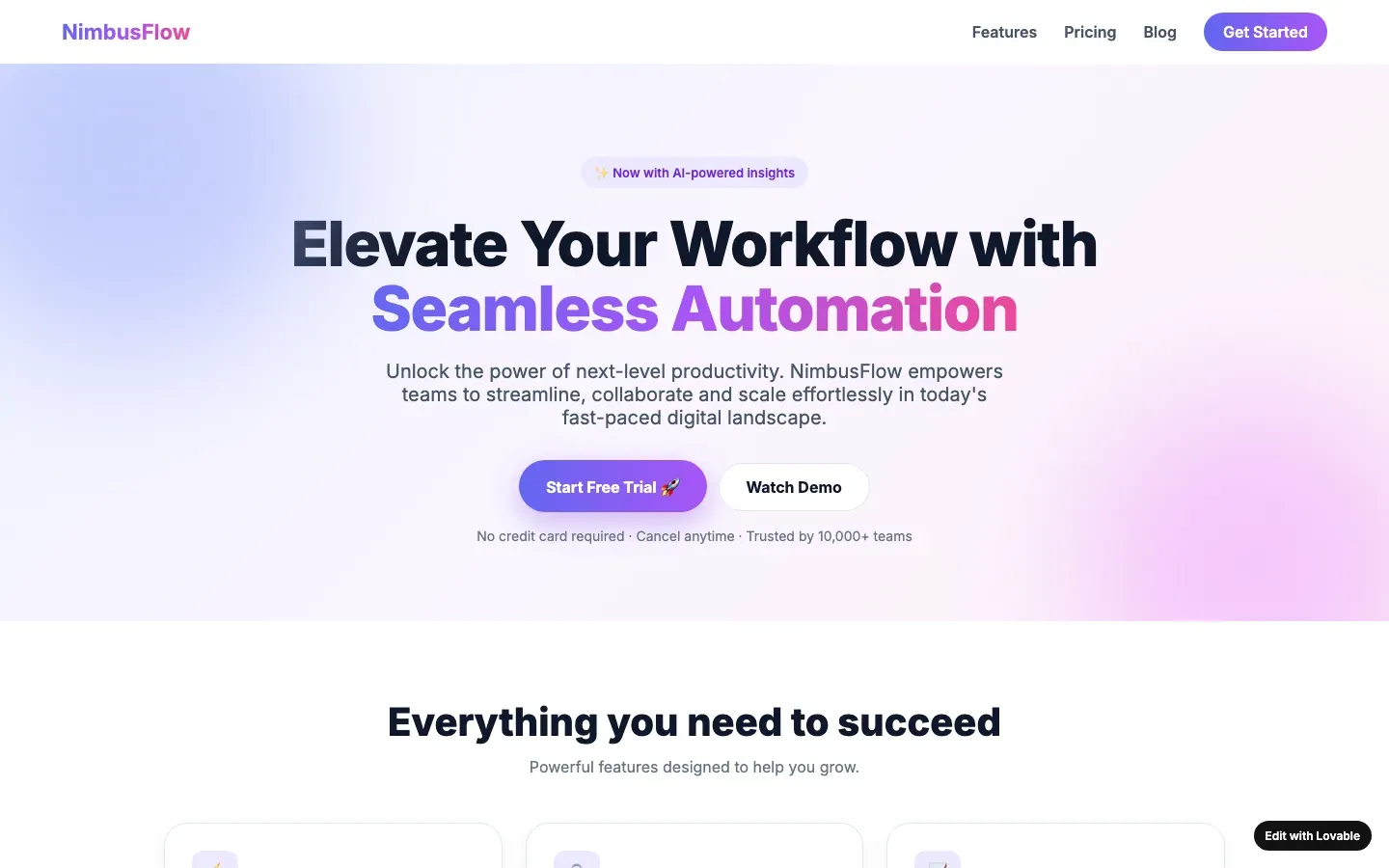
What it looks like
A hero background, a primary button or a headline that fades from indigo through violet, sometimes on into pink. In Tailwind’s vocabulary it is from-indigo-500 to-purple-600, usually behind white centred text and two pill buttons, often with a soft glow behind the product shot.
Why it gives a page away
Indigo was the default button colour of Tailwind UI for years, and the models that generate interfaces learned from the code that used it. The result is that thousands of unrelated businesses share one colour nobody picked. The colour is not wrong. It is unchosen: it arrives with the defaults and says nothing about the brand, which is the whole job of a brand colour.
How to check your own site
Put your logo next to your hero. If the logo has no purple in it and the hero does, the hero was not designed for the brand. Then search the stylesheet for indigo and purple; a page that uses both and nothing from the logo was never looked at with the logo in hand.
What a designer would do instead
Take the colour from the logo, the shopfront, the packaging or the product, and use it flat, as one band or one button, instead of a fade. A colour that belongs to the business beats any gradient that belongs to a framework, even if it is beige.
When it is not a tell
A brand whose identity is purple. Then the gradient is a decision, the entry does not tick it, and the site has to be judged on everything else.
Sources
- Communeify, "Why Does AI Love Purple?", 10 August 2025
- Alan West, "Why Every AI-Built Website Looks the Same", DEV Community, 2026
Builders whose defaults include this one
An entry names a builder only when its fingerprints are visible; this tell is one of them for Lovable.
Other tells in visual style
- Glass panels: Semi-transparent panels with a backdrop blur and a thin light border, stacked over a gradient so there is something to blur.
- Glowing blobs and orbs: Blurred circles of colour floating behind the content, or a glowing orb as the hero image of a product that has no shape.
- Gradient text: A headline, or one word in it, filled with a colour gradient and clipped to the letters.
- Inter or Poppins, untouched: The page is set in Inter, Poppins or the framework default at the default sizes, with no type decision visible anywhere.
- Permanent dark mode: A near-black page for a business that has no reason to be in the dark: a bakery, a physiotherapist, a tax advisor.
- Rounded corners on everything: Cards, buttons, images, inputs and badges all share one large corner radius, usually the framework's largest preset.
- Second-generation tasteful defaults: Cream with terracotta, or near-black with acid green, applied as the automatic answer to "don't make it look like AI".
- The italic serif accent word: One word of the headline set in an italic serif, the rest in a sans, as the single "designed" touch on the page.